What's new

New features, improvements and fixes, release by release. Every update is live for all Fleetwire accounts.

October 2026

πŸ“± The Fleetwire app is here, plus booking invoices, Bouncie alerts & more

The Fleetwire app is live on Android, so you can run check-ins, payments and signed agreements from the lot. Plus a rebuilt Charges and invoices area on every booking, smarter Bouncie alerts, and maintenance that follows your mileage. Here's what shipped.

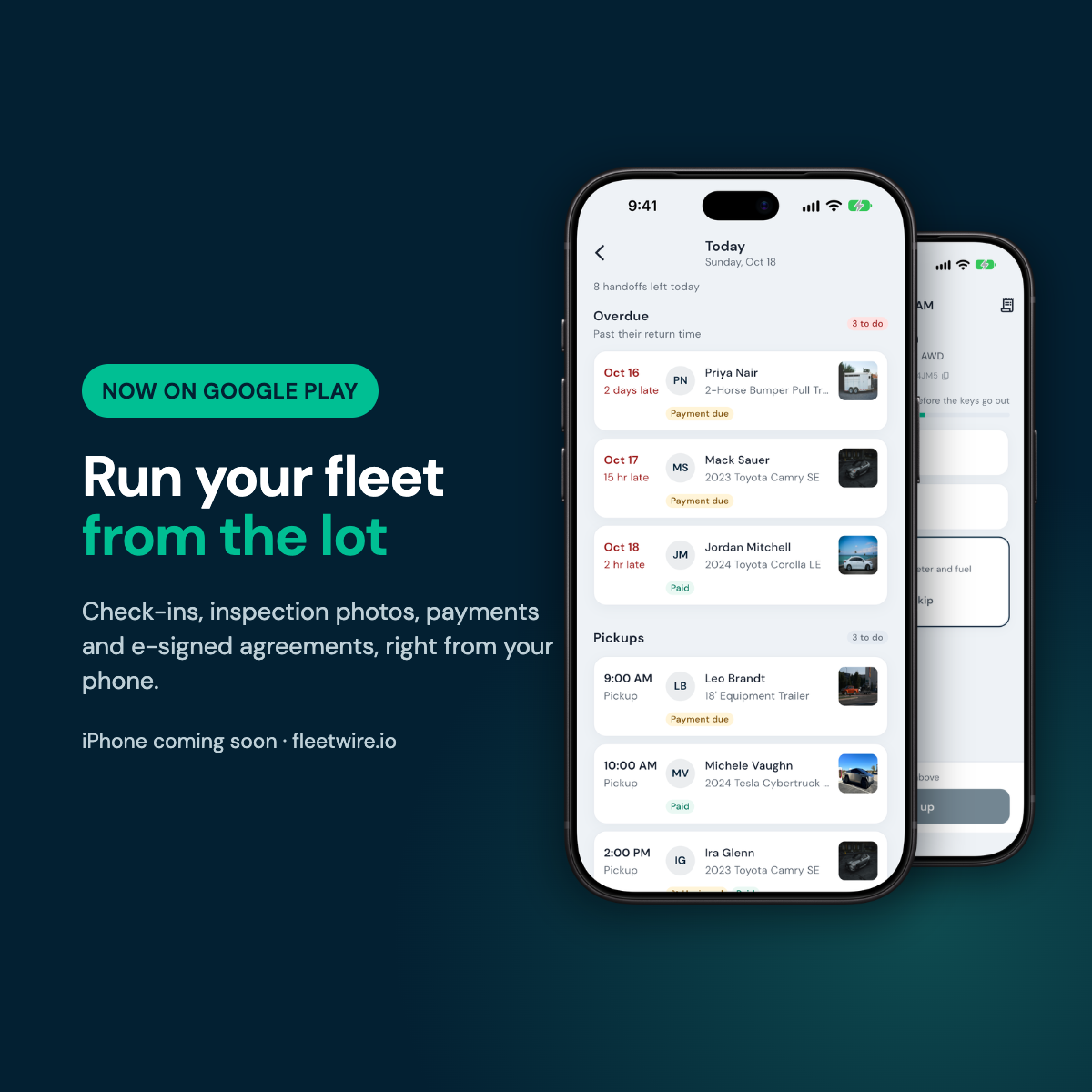
πŸ“± The Fleetwire app, on Android

The Fleetwire app, now on Google Play

Run your fleet from the lot. Sign in with your existing Fleetwire account and you'll have:

  • Today at a glance. Today's and tomorrow's pickups and returns, and what's free, the moment you open the app.
  • Guided check-in and check-out. Step-by-step photos, odometer from a photo, fuel, and damage marked on a diagram.
  • Get paid on the spot. Charge the card on file, send a pay link by text or QR code, and handle deposits and refunds.
  • Signed before the keys. Send the agreement for e-signature, or let the renter scan a QR code and sign at the counter.
  • Instant alerts for new bookings, payments and signed agreements.

iPhone is in review with Apple and coming soon. Get the app β†’

🧾 Charges and invoices, on every booking

  • Late charges get their own invoice. Add a toll, fuel or damage charge after the renter has paid and it goes on a follow-up invoice with just that charge, instead of reissuing everything. Choose how this works under your invoice settings.
  • Invoices on the booking page. See every invoice for a trip, its status, and resend or collect from one place.
  • Build an invoice from any charges. Pick exactly which charges go on it, or send a full statement of the whole booking.
  • Adjust a finalized invoice with a correction line instead of starting over, and discounts given after payment become a refund line automatically.
  • Text a document to any number, not just the customer's, and the public invoice page now fits small screens.

πŸ“‘ Bouncie, smarter

  • Alerts that matter. Get an email and a push notification when a car's check engine light comes on, its battery runs low, or the device is unplugged.
  • Check engine light opens a repair record on the vehicle automatically, so nothing slips.
  • Driving report on every rental: distance, driving time, top speed, and hard braking and acceleration for the dates the renter had the car, right on the order page.

πŸ”§ Maintenance that follows your miles

  • Repeat services by mileage, like an oil change every 5,000 miles, not just by date.
  • Know when it's coming. Odometer reminders now say things like "due in about 1,200 mi, roughly 9 days," based on how the car is actually driven.
  • Connected cars update the odometer at the end of each trip, so reminders stay accurate without typing in mileage.

πŸš— Turo, more reliable

  • Forwarding check. Fleetwire now tells you if your Turo emails aren't arriving, with step-by-step fixes, including the Microsoft 365 setting that silently blocks forwards.
  • Richer Turo orders: renter photos, a pickup map pin, earnings, mileage and location, with $1,000+ trips and multi-day counts read correctly.

✨ More improvements

  • Charging service fee. Add your own fee, as a percent, a flat amount or both, when you bill renters for Tesla Supercharging. Set it up on your Tesla connection.
  • AI listing descriptions are now on for every account.
  • More currencies: Australian, British and New Zealand dollars.
  • Faster photo uploads for listings.
  • Cleaner screens for your team: staff only see the buttons they have permission to use, and the order sidebar, extend dialog and payment details got a polish.
  • Fixes: canceled trips no longer show a balance due, and partial rental days round up correctly in the order editor.

As always, thanks for renting with Fleetwire. Tell us what you'd change at hi@fleetwire.io.
Get the Fleetwire app β†’

✍️ Sign before you pay, Zapier, self-serve extensions & more

A big few weeks: renters can sign before they pay and extend their own trips, Fleetwire talks to thousands of apps through Zapier, and a lot of everyday screens got faster and clearer. Here's what shipped.

✍️ Signed before they pay

Turn on Require a signed agreement before payment and renters sign your rental agreement as part of checkout, before their card is charged. The dates are held while they sign, so nobody else can grab the vehicle mid-checkout. It works with every way you take payment, including pay at pickup and booking requests.

How to turn it on β†’

⏱️ Renters can extend their own trips

Once a trip has started, renters see an Extend Trip button on their reservation page. They pick a new return time, see the price, and send the request.

  • You stay in control. Approve or decline from the order page, or let Fleetwire approve automatically whenever the vehicle is free.

  • Paid before it counts. Approving sends a payment request for the difference, and auto-approve waits while an earlier extension is unpaid.

  • Rolling rentals hold their dates. Auto-Extend plans now hold their next dates on your calendar, end when the rental ends, and show up on your dashboard if they're paused.

Turn it on under Settings β†’ Online reservations β†’ Guest Extensions.

⚑ Zapier

Send bookings, payments, trip reminders and new customers to Google Sheets, Slack, QuickBooks and thousands of other apps, and let Zaps create customers, block dates and send payment requests in Fleetwire. Set it up under Connections β†’ Zapier. Included on the Premium plan.

Connect Fleetwire to Zapier β†’

πŸ›» Rent more than cars, in your own words

  • Any kind of rental. List trailers, watercraft, golf carts or equipment with no make or model required. Checkout only asks for a driver's license or insurance when the item needs it.

  • Your labels. Call them guests instead of customers or bookings instead of orders under Settings β†’ Regional & display. The dashboard, storefront, emails and documents all follow.

πŸ‘₯ Customers, clearer

  • Quick filters for verified and unverified renters, and a sortable Last trip column.

  • Insurance at a glance. Axle verifications now show on customers and orders, and you're warned when a renter's policy expires before their trip ends.

  • Works on your phone. The customers list switches to cards with a filters sheet on phones and tablets.

  • Hide amounts. Tap the eye button on the Customers page to blur every dollar figure in the dashboard, handy when someone's looking over your shoulder.

🏒 Your fleet settings, rebuilt

  • Branches have a cleaner page with a map of the address, and pickup and return can follow the branch address with one switch. Those spots now print on your order documents too.

  • Vehicle class ages now count. If a vehicle's class has a minimum age, checkout uses whichever is stricter, the listing's or the class's. The listing's settings tell you when the class is the one deciding.

  • SIPP code picker. Not sure what CDAR means? Open the picker from a vehicle class, see each letter explained, and click to set it.

✨ More improvements

  • Connections got one hub that shows what's connected and what needs attention, with a simpler Turo setup. Getaround has been retired following its U.S. shutdown.

  • Listing quick actions: the menu on each listing card can edit, share, start an order, pause, move or archive.

  • Notifications are labelled and filterable by category, and you can act on them right where they appear.

  • New analytics: trip length, booking lead time and extras by category. Vehicles you mark as sold drop out of Fleet Performance.

  • Search (⌘K) now finds booking requests.

  • Team: resend a pending invite, and the last admin can no longer be removed by accident.

  • Bouncie reads the odometer and fuel at trip start and end, and tells you when it needs reconnecting.

  • Public roadmap: vote on what we build next and hear when the features you asked for ship.

As always, thanks for renting with Fleetwire. Tell us what you'd change at hi@fleetwire.io.
See what's next on the roadmap β†’

September 2026

πŸš— Tesla, rebuilt: odometer, phone keys & Supercharger fees

We rebuilt the Tesla integration from the ground up. Connect your Tesla account and your cars do the paperwork for you.

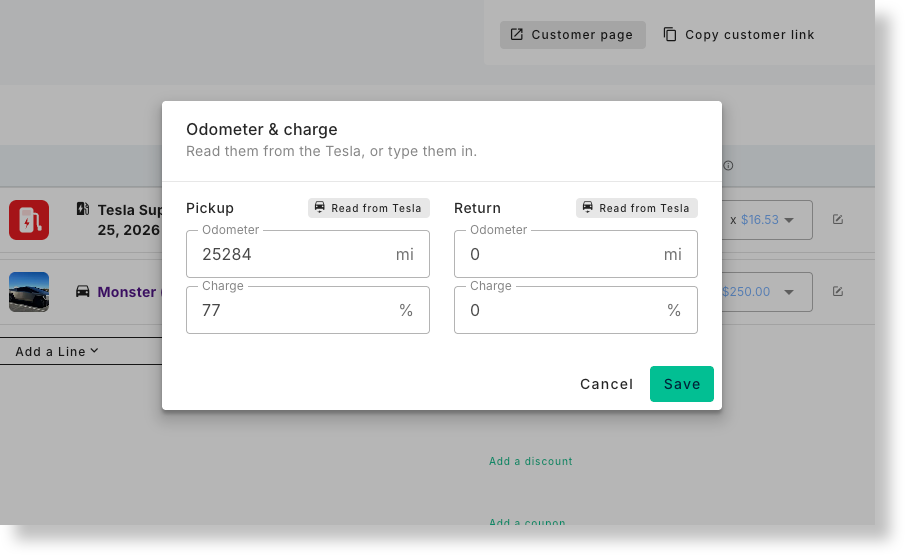
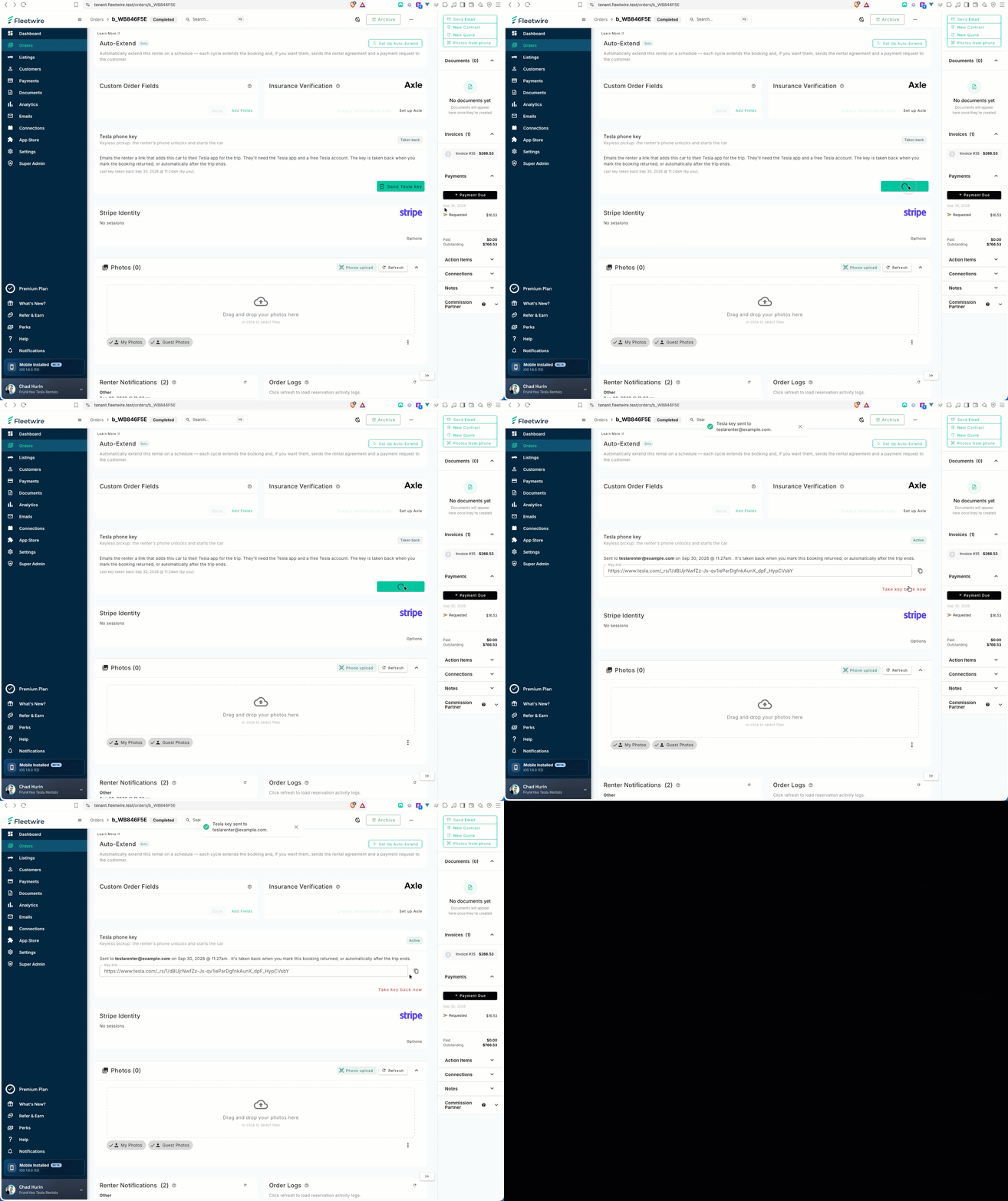
An order showing the pickup odometer and charge read from Tesla, and the Tesla phone key card

πŸ“ Odometer and charge, read for you

When a trip starts and ends, Fleetwire reads the car and fills in the order's odometer and battery charge. Anything you've typed yourself is never overwritten.

πŸ”‘ Phone keys for renters

Click Send Tesla key on an order. Your renter gets an email with a link that adds the car to their Tesla app, and the key is taken back automatically when the trip ends.

The Send Tesla key card on an order

⚑ Supercharger fees, matched to the trip

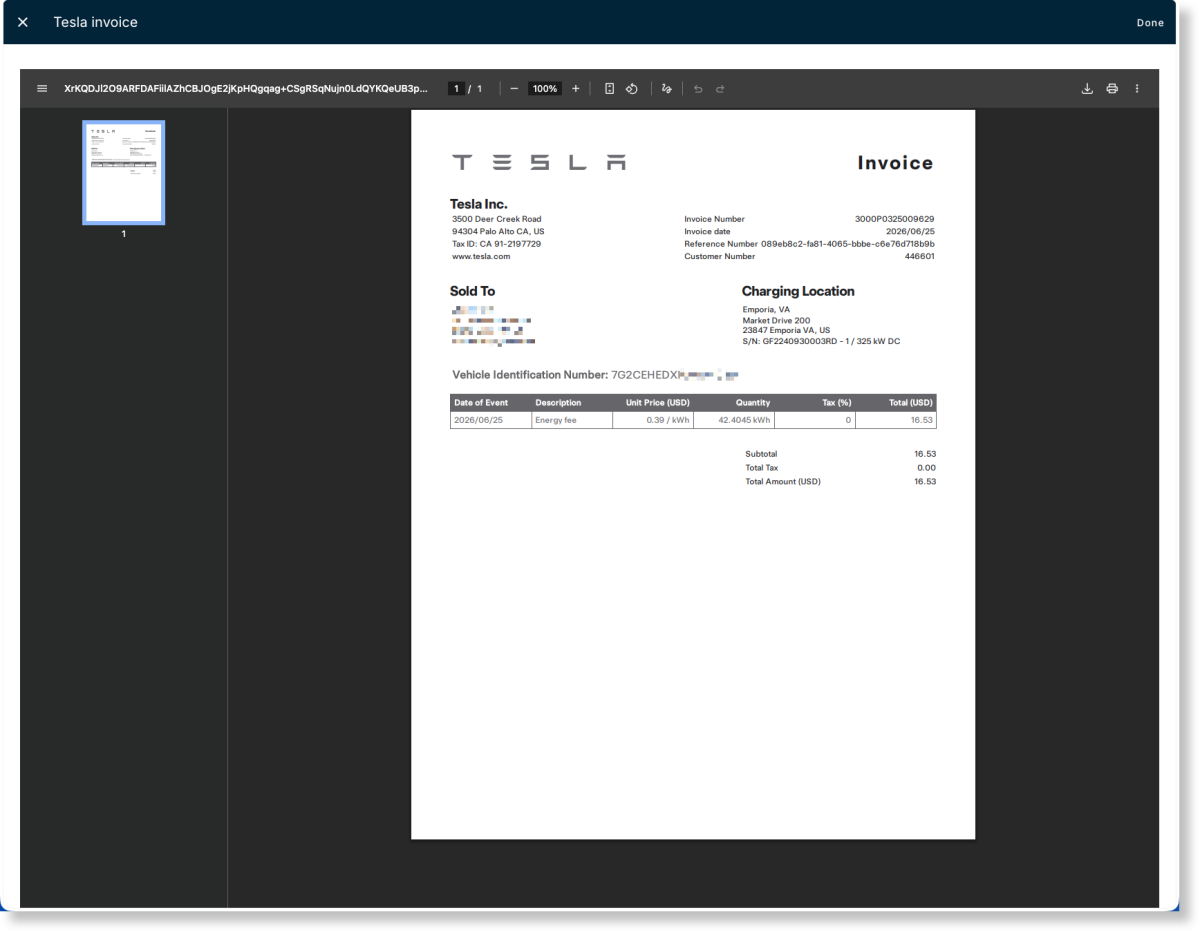
Every few hours we check your Supercharger history and match each fee to the booking it happened in. Get a text when one lands, email the renter automatically, and invoice them in two clicks. Invoice PDFs are one click away.

A Supercharger session matched to a booking, with the View PDF button

πŸ”‹ Live status for every car

Battery, range, charge limit, locks, doors, tire pressure, temperature and a map. If a car is asleep you'll see its last reading; if it's offline we'll tell you, so you don't waste a wake.

Connected Tesla before? Sign in once more under Connections β†’ Tesla. Tesla changed how apps connect, and the new connection is the secure one.

Set up your Tesla β†’

June 2026

Global Search, Dark Mode & Smarter Email Automation

We've been hard at work making Fleetwire faster, more powerful, and easier to use. This release introduces Global Search, Dark Mode, major improvements to email automation, and dozens of usability enhancements across the platform.

πŸ” Global Search

Finding what you need in Fleetwire is now faster than ever. Global Search lets you instantly search across your account to quickly jump to bookings, customers, listings, trip extras, settings, email templates, taxes, and more.

Simply click the search bar in the dashboard or press ⌘ K on Mac or Ctrl + K on Windows/Linux to start searching from anywhere. Results appear instantly as you type and only include resources you have permission to access.

Global Search also supports keyboard navigation, making it easy to move through results and open pages without leaving your keyboard.

πŸŒ™ Dark Mode is Here

Fleetwire now supports Dark Mode across the dashboard. Whether you're working late, reducing eye strain, or simply prefer a darker interface, you can switch between light and dark themes with a single click.

The new theme has been carefully designed to maintain readability while giving the platform a modern look and feel.

We've been hard at work making Fleetwire more flexible, more powerful, and easier on the eyes. Here's what's new!

πŸ“§ Scheduled Email Queue Management

Automated emails just got a major upgrade. Instead of emails being generated and sent behind the scenes, Fleetwire now creates a visible scheduled email queue for every booking.

You can see exactly what emails are scheduled to go out, when they'll be sent, and manage them before they reach your renters.

✏️ Edit Automated Emails Before They Send

Need to customize a reminder for a specific renter? You can now edit the subject line and email content of any scheduled email before it's delivered.

Each scheduled email stores its own snapshot, allowing you to personalize communications without affecting the original template.

⏰ Reschedule, Skip, or Send Now

Plans change, and now your automated emails can too. Reschedule upcoming emails, skip messages that are no longer relevant, or send them immediately with a single click.

This gives your team complete control over every automated communication.

πŸ“‹ Scheduled Emails on Every Order

A new Scheduled Emails panel has been added directly to the order page, making it easy to view upcoming reminders, confirmations, follow-ups, and other automated messages related to that booking.

See what's scheduled, what's been sent, and what has been skippedβ€”all in one place.

πŸ“¨ Company-Wide Email Queue

Email Settings now includes a global Scheduled Email Queue where you can manage all upcoming automated emails across your company.

Filter by status, review upcoming sends, and quickly take action without opening individual bookings.

πŸ“ Improved Email History & Activity Logs

Automated emails are now fully integrated into Order Activity Logs and Email History.

You'll have a complete audit trail showing when emails were sent, customized, skipped, rescheduled, or delivered, making communication tracking easier than ever.

πŸš€ Reliability Improvements

The automated email system has been rebuilt behind the scenes to use a dedicated queue. This improves delivery reliability, prevents missed sends, and gives better visibility into upcoming communications.

πŸ› Additional Improvements

  • Improved visibility into scheduled renter communications

  • Better tracking of automated email delivery history

  • Enhanced control over booking-specific email workflows

  • Numerous performance and usability improvements throughout the platform

As always, thank you for using Fleetwire. We're continuously working to make managing your rentals faster, easier, and more reliable.

πŸš€ Pricing Structure Templates Just Got More Powerful

We're excited to announce a major update to Fleetwire's pricing structure templates.

Rental pricing isn't always as simple as charging a daily rate. Many businesses offer discounted multi-day pricing, weekly packages, monthly packages, or a combination of all three. Until now, these pricing strategies often required workarounds or complex pricing structures.

With this update, pricing structure templates now support Tiered Pricing and Repeatable Packages, giving you more flexibility and control over how rental pricing is calculated.

πŸ“ˆ Tiered Pricing

Tiered Pricing is perfect for businesses that want to offer discounts as reservation duration increases.

For example:

  • 1 Day = $55

  • 2 Days = $95

  • 3 Days = $130

After the final tier, Fleetwire can automatically continue pricing using your configured increments, making it easy to support longer reservations without creating a pricing tier for every possible duration.

πŸ”„ Repeatable Packages

Repeatable Packages are ideal for weekly and monthly rental programs.

For example, if you charge:

  • 1 Day = $55

  • 1 Week = $330

A 14-day reservation will automatically use two weekly packages. This makes it easy to create package pricing that scales naturally as reservation length increases.

⚑ Easier Pricing Template Setup

We've also improved the pricing template builder to make setup easier.

  • Enter a target price and Fleetwire will automatically calculate the multiplier.

  • Preview pricing using an example base price before applying the template.

  • Create a pricing strategy once and apply it across multiple listings.

Whether you're managing daily rentals, weekly packages, monthly subscriptions, or a mix of everything, pricing structure templates now provide significantly more flexibility while reducing setup time.

To learn more, check out our updated guide on creating pricing structure templates.

https://help.fleetwire.io/en/article/how-to-create-pricing-structure-template-cxlndp/

December 2025

πŸš€ What’s New at Fleetwire - December 2025

We’ve been busy rolling out powerful new features designed to streamline your workflow, strengthen security, and enhance your rental management experience.

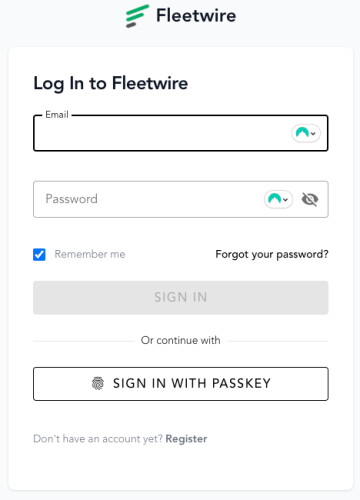
πŸ” Passkey Authentication

Skip the passwordsβ€”log in using Face ID, Touch ID, or your device's biometrics. It's faster, more secure, and easier than ever.

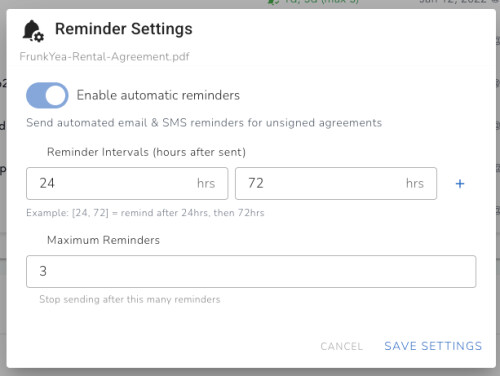
πŸ“§ Automated Rental Agreement Reminders

Never chase down unsigned agreements again. Set up automatic email and SMS reminders on a per-template basis to gently nudge renters until they sign. Configure reminder intervals and maximum reminder counts to match your workflow.

πŸ”„ Extension Auto-Send Agreements

When extending a booking, you can now automatically generate and send an updated rental agreement. The system intelligently copies over previously signed data and defaults to your last-used template for a seamless experience.

πŸ“‹ Drag & Drop Line Items

Reorder line items on orders with a simple drag and drop. Perfect for customizing the presentation of charges and extras on invoices.

πŸ”„ Rotate Listing Images

Accidentally uploaded a sideways photo? No problem! You can now rotate listing images directly in the interface without re-uploading.

🏷️ Tags & Organization

Organize your customers and listings with custom tags. Create tags like 'VIP', 'Corporate', 'Premium Fleet', or any category that helps you manage your business. Filter and search by tags to quickly find what you need.

🚫 Block Problematic Renters

Protect your fleet by blocking specific renters by email, phone, or ID. Blocked renters are automatically tagged and prevented from creating new bookings. Blocks sync with Stripe for complete payment protection.

πŸ“Š Custom Data Exports

Export booking data with complete control over which fields to include. Choose from dozens of columns including booking details, vehicle info, renter data, custom fields, and more. Exports are processed in the background and delivered when ready.

πŸ“‹ Drag & Drop Line Items

Reorder line items on orders with simple drag and drop. Perfect for customizing the presentation of charges and extras on invoices and receipts.

⏱️ Minimum Trip Duration

Set minimum trip durations per delivery location to ensure rentals meet your operational requirements. Great for managing peak times and special locations.

πŸ› Bug Fixes & Improvements

  • Enhanced envelope status display in documents panel

  • Improved e-sign data persistence across agreement updates

  • Better subscription tier messaging for e-sign features

Got feedback or a feature request? We’re all earsβ€”reach out anytime. Thanks for being part of the Fleetwire journey!

February 2025

Introducing Tags for Customers & Listings!

Effortlessly organize your customers and listings with custom tags. Now, you can assign tags to group similar customers or categorize listings, making it easier to search, filter, and find exactly what you needβ€”fast! πŸš€

βœ… Quickly label customers & listings
βœ… Improve search & filtering
βœ… Stay organized effortlessly

Try it out today and bring next-level organization to your workflow! 🎯

June 2023

Instantly Verify Insurance Through Axle On Fleetwire!

We are excited to announce that Fleetwire has partnered with Axle to offer you instant insurance verification for your renters. Axle works with a range of rental car businesses today - including Getaround, GreenMotion/U-Save and many existing Fleetwire customers.

With this new integration, you can now streamline your rental process and ensure that your renters have the appropriate insurance coverage, preventing up to $5 of unrecovered loss per rental day and hours on the phone with insurance carriers.

How it works

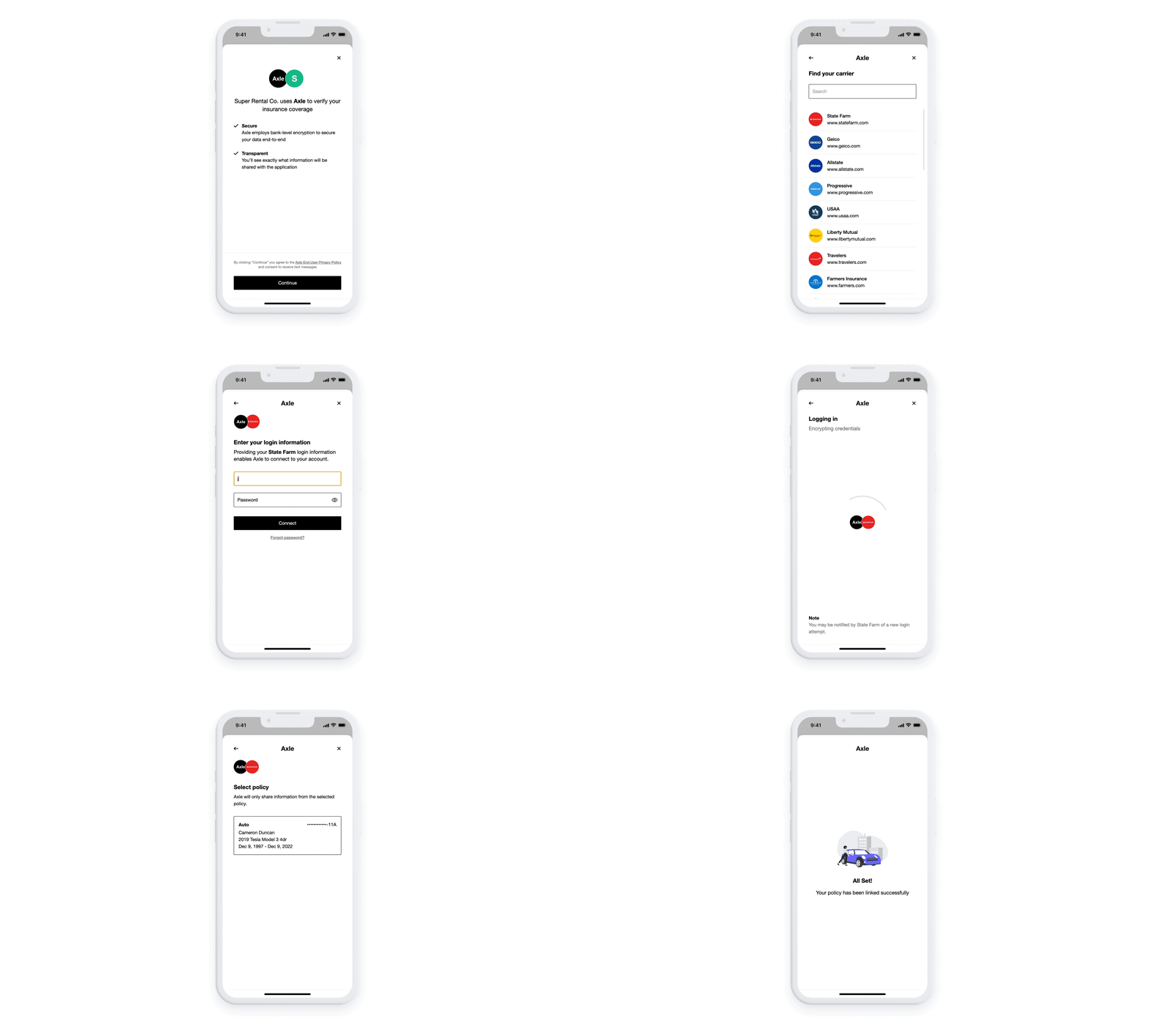
Based on your preferences, you have the option to automatically send an Axle insurance verification link to your renter upon booking confirmation. Your renter will be directed to log into their insurance provider using Axle to retrieve their policy information. Once the process is completed, Fleetwire will inform you of the outcome and include the verification details in the reservation and renter records.

To learn more about Axle, visit https://axle.insure

What does it cost

Similar to Stripe Identity, Axle charges a fee for each successful connection. However, you don't need to create a separate account as Fleetwire has already arranged a fixed price per insurance verification. The integration with Axle is an add-on feature for Fleetwire and can be used by purchasing credits.

To get started, Fleetwire will start you off with one credit so you can give it a try. You can purchase additional credits at any time for $2.2 each.

How to get started

Head on over to connections > Axle and flip on the Axle integration. You’ll get one free credit, but can load up on credits any time from the connections tab. If you run out of credits a verification link will not be sent to the renter, so be sure to keep an eye on your credits!

If you have any questions or need help getting started, please feel free to contact us hi@fleetwire.io or the Axle team at support@axle.insure.

Thanks!

The Fleetwire & Axle team

Check it out

https://tenant.fleetwire.io/connections/axle/

Fleetwire platform updates

It has been a while since our last update, but rest assured, we have been continuously working behind the scenes to bring you bug fixes and enhancements on a weekly basis. While most of these updates happen seamlessly without announcement, we would like to highlight a few recent additions:

  • Axle Insurance Verification Automation: We are excited to introduce automated insurance verification through our partnership with Axle. Stay tuned for an upcoming announcement with more details. Check it out

  • Fixed Amount for Taxes and Fees: We have implemented a fixed amount option for taxes and fees, providing more flexibility in your pricing structure.

  • Enhanced Reservation Filtering: You can now filter reservations based on payment and booking status, allowing for easier management and organization.

  • Hidden Trip Extras for Back Office: We have introduced the ability to hide trip extras, making them accessible only from the back office for smoother operations.

  • Security Deposit Collection: You now have the option to require the collection of a security deposit during the checkout process.

In addition to these updates, we have some other exciting developments:

  • Clover integration as a new payment provider is almost complete.

  • The full integration of Fleetwire GPS is still in progress. Click here to learn more about this upcoming feature.

  • Our pricing structure is nearing completion, bringing you more transparency and options.

  • The Fleetwire mobile app is just around the corner, with an estimated launch in 2-3 weeks.

  • Any many others

August 2022

Update on features and bugs

Hi all,

We have many new features and bug fixes pushed over the last several weeks.

Some of the feature additions

  • Delivery locations can now have a tax profile. Need to charge different taxes based on location. ie Airports. Now you can.

  • Vehicle Features: You can now add more vehicle features like seat and door count. Additionally, you can add features like the vehicle has GPS, toll pass, USB input, and more.

  • Fleet resources can now be filtered by what's available for a given date range or by year, make, and model, or if has a car-sharing connection.

  • Custom-facing checkout page URL query parameters: you can add date/time ranges and even a coupon to a sharable URL to set the checkout page for the renter. Check out this article

  • You can now see coupon redemption on the coupons page.

  • Bouncie integration enhancements. You can now see trips and other data for connected vehicles.

  • WordPress plugin update: Check it out here: HERE

  • Code Snippet updates for your website. The snippets now include vehicle features (doors, seats, etc) and fleet availability.

  • Distance allowance can be capped.

  • Add CSS styles for your checkout page (along with Javascript)

  • Added checkbox element for e-sign

  • And much more

Some bug fixes

  • Daylight savings fix when a reservation crosses one of the two dates.

  • Cache busting for listings (sometimes an update wouldn't reflect immediately after saving.

  • Turo login window fixed.

  • Turo 2FA fixed.

  • And many more.

March 2022

A few new features.

  • You can now have the pickup time set to whatever you prefer.

  • Mile overage fee now shows up under allowance on the checkout page.

  • Billing name added on payments so you can match reservation names.

  • Global listing price adjustments.

  • Turo renters DOB now pulls in and is displayed.

January 2022

Custom Daily Pricing πŸš€

You can now change a listing price for a given day. Raise or lower a listings price for holidays, weekends or special events without changing the default price.

Go ahead & navigate to one of your listings calendar and update a price for this weekend (you can also select to update the related Turo listings daily price). Your customer view of the calendar at checkout will let them know the daily price for each day when they hover over a specific day.

Currency Controlls πŸ’±

You can now update your currency to match your locale. Also, you can swap symbol location (€2.99 vs 2.99€) or use currency code (ie. 2.99 USD or 2.99 EUR).

This will reflect across Fleetwire admin panel, your listing catalog, booking confirmation emails and sms.

Note: Your default currency is what will be used when creating payments with Stripe.

Check it out.

NHTSA Recall Notifications πŸ”₯

We NHTSA checks for each of your vehicles.

Your listings maintenance tab should show all recalls for a vehicle based on Year/Make/Model. Soon will add search by VIN so you can filter recalls that have already been addressed. Enjoy!

October 2021

Vehicle Lockbox Settings ⚑️

We added a new variable for your vehicle's lockbox for automation messages.

Head to your listings and choose a vehicle. Under the settings tab, you will find two new fields to save your lockbox location (such as a numbered lockbox or address) and the lockbox code. You can include these two new variables in your automation messages. Enjoy!

Check it out!

June 2021

Webcal added

Keep track of your direct and car-share bookings inside of your calendar!

Head over to your Integrations to directly add to Google calendar, Apple calendar or any other calendar software that you use. You can also download the .ics file for other use.

May 2021

Order your listingsπŸ₯‡

Want to show your listings in a certain order? Now you can!

Head over to your listings dashboard and switch to the list view. Then drag and drop in the order you want your listings to appear for you and your customers.

Trip Photos πŸ‘€

You and your guest can now upload before/after trip photos.

You can upload photos as a host on the order status page. Your guest can upload their photos on the booking confirmation page that they are redirected to after completing a booking (also emailed to them.)

Bug Fixes️ & Tweaks

Continued bug fixes

Few items:

  • Payment links on booking status page for renters
  • E-sign shows remaining required fields
  • E-sign save progress

We work everyday to continue to enhance your experience. Please let us know if there is anything that needs our attention or you'd like to see implemented.

April 2021

Auto Tolls ⚑️

Save time and missed toll charges with FleetWire.io's auto tolls. When a vehicle goes through a support toll agency we can auto detect the renter and send them an invoice.

We're working to support as many toll agencies as we can so if we're missing yours you can add it to the wishlist.

Check it out!